


How to Create an Ergonomic Home Office Setup
How to Create an Ergonomic Home Office Setup
Improve Comfort, Productivity, and Long-Term Health

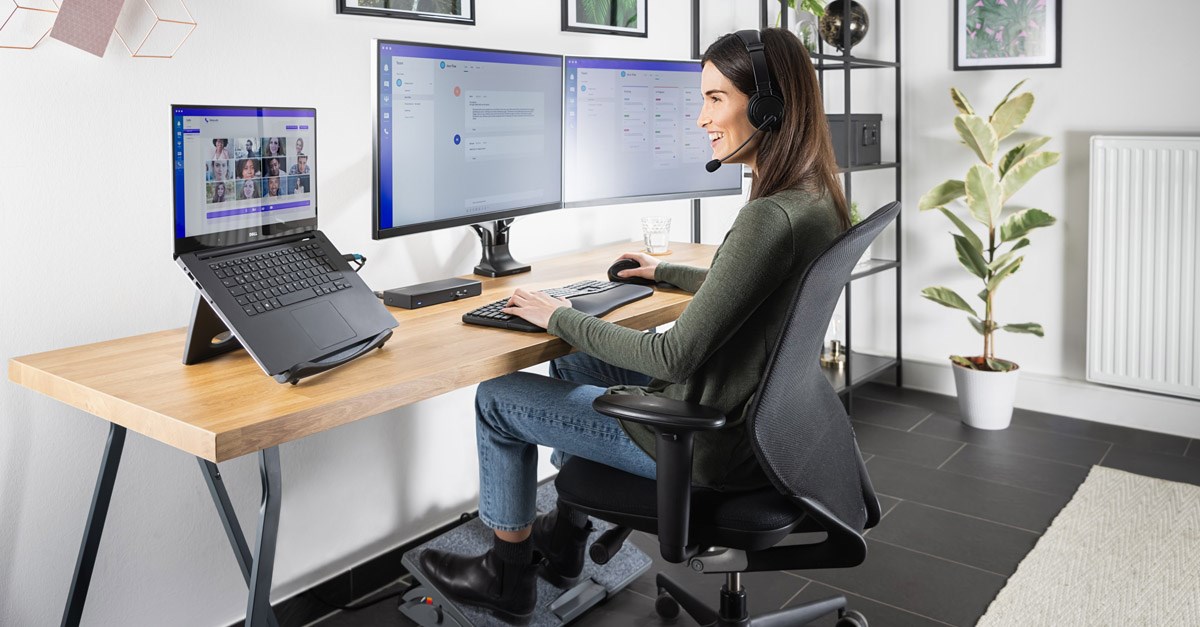

As remote and hybrid work become more common, having a well-designed home office is essential. An ergonomic home office setup helps reduce discomfort, prevent long-term injuries, and boost productivity—without requiring a complete office makeover.
This guide explains how to create an ergonomic home office setup using smart positioning, supportive furniture, and healthy work habits.
Why Ergonomics Matter in a Home Office
Poor ergonomics can lead to:
-
Back and neck pain
-
Wrist and shoulder strain
-
Eye fatigue and headaches
-
Reduced focus and productivity
A properly set up workspace supports your body and helps you work more comfortably throughout the day.
1. Choose an Ergonomic Chair First
Your chair is the foundation of your setup.
Key features to look for:
-
Adjustable seat height
-
Lumbar support
-
Armrests that don’t force shoulder tension
Your feet should rest flat on the floor, with knees at or slightly below hip level.
2. Set Your Desk at the Right Height
Desk height affects posture more than you think.
Ergonomic desk tips:
-
Elbows should be at a 90-degree angle when typing
-
Forearms parallel to the floor
-
Shoulders relaxed
If your desk is too high or low, consider a desk riser or adjustable desk.
3. Position Your Monitor Correctly
Monitor placement protects your neck and eyes.
Ideal monitor setup:
-
Top of the screen at or slightly below eye level
-
Screen about an arm’s length away
-
Centered directly in front of you
Using a monitor stand can quickly improve ergonomics.
4. Optimize Keyboard and Mouse Placement
Hand positioning matters.
Best practices:
-
Keyboard close enough to avoid reaching
-
Mouse at the same height as the keyboard
-
Wrists in a neutral, relaxed position
Consider ergonomic keyboards or vertical mice if you work long hours.
5. Improve Lighting to Reduce Eye Strain
Good lighting prevents fatigue.
Lighting tips:
-
Use natural light when possible
-
Add a desk lamp with adjustable brightness
-
Avoid screen glare
Balanced lighting keeps your eyes comfortable throughout the day.
6. Keep Frequently Used Items Within Reach
Reduce unnecessary movement.
Ergonomic organization ideas:
-
Store essentials within arm’s reach
-
Use drawer organizers
-
Keep cables tidy
A clutter-free desk supports focus and efficiency.
7. Support Your Feet and Lower Body
Lower body comfort is often overlooked.
Helpful additions include:
-
Footrest if your feet don’t reach the floor
-
Anti-fatigue mat for standing desks
Proper support improves circulation and posture.
8. Take Regular Movement Breaks
Even perfect ergonomics can’t replace movement.
Healthy work habits:
-
Stand and stretch every 30–60 minutes
-
Practice neck and shoulder stretches
-
Follow the 20-20-20 rule for eyes
Movement keeps your body energized and pain-free.
Final Thoughts: Ergonomics Is an Investment in Yourself
Creating an ergonomic home office setup isn’t about luxury—it’s about health, comfort, and sustainability. Small adjustments can make a big difference in how you feel during and after work.
A supportive workspace helps you work better today and protects your body for the future.